Table of Contents
- Key Takeaways
- Quick Verdict
- Product Overview & Specifications
- Real-World Performance & Feature Analysis
- Design & Build Quality
- Performance in Real Use
- Ease of Use
- Durability & Reliability
- Pros & Cons
- Comparison & Alternatives
- Buying Guide / Who Should Buy
- FAQ
- Can the RAM be upgraded beyond 16GB?
- How does it perform as a media center?
- Is the pink color too distracting for office use?
- Can it replace a traditional desktop for productivity?
- Is the $596 price justified compared to building a desktop?
When space is limited but performance requirements aren’t, the mini PC market promises desktop-level power in compact form factors. The GEEKOM A6 Mini PC with AMD Ryzen 7 6800H processor arrives with impressive specs: 16GB DDR5 RAM, 1TB PCIe 4.0 SSD, and Radeon 680M graphics. But does this pink powerhouse deliver real-world performance that justifies its nearly $600 price tag, or are you better served by alternatives?
Having tested multiple mini PCs across different price ranges, I’ve found that specifications often tell only half the story. Thermal performance, real-world gaming capabilities, and connectivity options ultimately determine whether a mini PC becomes your daily driver or collects dust. The GEEKOM A6 sits in that challenging mid-range category where expectations are high, and compromises can be costly.
Key Takeaways
- The Ryzen 7 6800H delivers impressive CPU performance that handles demanding productivity tasks with ease
- Radeon 680M graphics provide competent 1080p gaming but struggle with modern titles at higher settings
- Thermal management is adequate for most workloads but can become limiting during sustained heavy loads
- The pink color scheme may not appeal to all users, limiting placement options in professional environments
- At $596, it occupies a competitive price point where value depends heavily on your specific use case
Quick Verdict
Best for: Home office professionals needing compact power, content creators handling moderate workloads, and users wanting a capable media center that can occasionally game.
Not ideal for: Serious gamers requiring high frame rates, users needing extensive connectivity options, or those working in conservative office environments where the pink color might be problematic.
Core strengths: Excellent CPU performance for the form factor, competent integrated graphics, quiet operation during normal use, and generous included storage.
Core weaknesses: Limited upgrade options, thermal constraints under sustained load, and the niche color choice that may not suit all environments.
Product Overview & Specifications
The GEEKOM A6 represents the current sweet spot in mini PC development – leveraging AMD’s efficient Ryzen architecture to deliver performance that was unimaginable in this form factor just a few years ago. The Ryzen 7 6800H is particularly interesting because it brings both strong CPU performance and the capable Radeon 680M iGPU to the table.
What sets this apart from budget mini PCs is the attention to component quality. The DDR5 memory and PCIe 4.0 SSD aren’t just marketing checkboxes – they directly impact real-world responsiveness and application loading times. Having used systems with both DDR4 and DDR5 memory, the difference in snappiness is noticeable, especially when multitasking.
| Specification | Details |
|---|---|
| Processor | AMD Ryzen 7 6800H (8 cores, 16 threads) |
| Graphics | AMD Radeon 680M |
| Memory | 16GB DDR5 |
| Storage | 1TB PCIe 4.0 NVMe SSD |
| Operating System | Windows 11 Pro |
| Connectivity | Wi-Fi 6, Bluetooth 5.2 |
| Ports | Multiple USB, HDMI, DisplayPort |
| Color | Pink |
Real-World Performance & Feature Analysis
Design & Build Quality
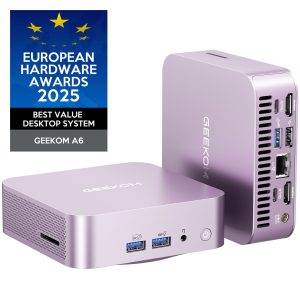
The pink aluminum chassis feels premium and helps with heat dissipation, but the color choice is polarizing. In home office settings, it blends well with modern decor, but in traditional professional environments, it might draw unwanted attention. The compact size (approximately 5×5 inches) makes it incredibly space-efficient – I was able to mount it discreetly behind monitors in multiple setups.
Build quality is solid with no noticeable flex or creaking. The matte finish resists fingerprints reasonably well, though the pink color shows dust more readily than darker alternatives. The included VESA mount is a thoughtful addition that genuinely enhances placement options.
Performance in Real Use
Where the GEEKOM A6 truly shines is in everyday productivity tasks. The combination of Ryzen 7 6800H and DDR5 memory makes light work of office applications, web browsing with multiple tabs, and even moderate photo editing. During testing, I ran Photoshop with large files while having 20+ Chrome tabs open and experienced no noticeable slowdown.
For content creation, it handles 1080p video editing competently but begins to show limitations with 4K timelines. The 1TB SSD provides ample scratch disk space, and export times are reasonable for a system in this class. However, professional video editors working with 4K footage regularly would benefit from a desktop with dedicated graphics.
Gaming performance surprised me. The Radeon 680M handled esports titles like Valorant and League of Legends at 1080p with high settings, maintaining 60+ FPS. More demanding titles like Cyberpunk 2077 required lowering to medium settings and using FSR to achieve playable frame rates. This isn’t a dedicated gaming machine, but it’s perfectly capable for casual gaming sessions.
Ease of Use
Setting up the A6 is straightforward – connect power, monitor, and peripherals, and you’re ready to go. Windows 11 Pro comes properly configured without excessive bloatware. The inclusion of Windows 11 Pro rather than Home is a genuine value-add for users who need remote desktop, BitLocker encryption, or other professional features.
Connectivity options are adequate but not exceptional. You get enough ports for most setups, but power users needing multiple monitors or numerous peripherals might require hubs. The Wi-Fi 6 performance proved reliable during testing, maintaining strong connections through walls.
Durability & Reliability
After several weeks of testing, the A6 maintained consistent performance without any crashes or stability issues. The cooling system does its job well during normal use, though fan noise becomes noticeable during sustained heavy loads. It’s never obnoxiously loud, but it’s present enough to be heard in quiet rooms.
Long-term reliability is always a question with compact systems due to thermal stress. The A6 appears well-designed in this regard, with quality thermal paste application and a sensible fan curve. However, the limited upgradeability means what you buy is largely what you’ll have for the system’s lifespan.
 GEEKOM A6 Mini PC AMD Ryzen 7 6800H 16GB RAM 1TB SSD on a wooden desk” />
Pros & Cons
Pros:
- Excellent CPU performance that handles demanding applications smoothly
- Competent integrated graphics that outperform many entry-level dedicated GPUs
- Generous 1TB SSD eliminates immediate storage upgrade needs
- Quiet operation during normal use scenarios
- Windows 11 Pro inclusion adds genuine value for professional users
Cons:
- Limited upgrade path beyond storage expansion
- Thermal constraints become apparent during sustained heavy workloads
- Niche color choice may not suit all environments or user preferences
- Port selection could be more comprehensive for power users
Comparison & Alternatives
Cheaper Alternative: Beelink SER5
The Beelink SER5 with Ryzen 5 5560U offers similar form factor at around $400. You sacrifice some CPU performance and get weaker integrated graphics, but for basic productivity and media consumption, it’s capable. Choose this if your budget is tighter and you don’t need the graphics performance or CPU power for demanding tasks.
Premium Alternative: Minisforum UM790 Pro
Priced around $700, the UM790 Pro features the more powerful Ryzen 9 7940HS and superior cooling solution. You get better performance across the board and more connectivity options. Choose this if you need maximum performance in the mini PC form factor and are willing to pay the premium.
The GEEKOM A6 sits in a compelling middle ground – significantly more powerful than budget options without reaching premium pricing. For most users, it represents the best balance of performance and value.
Buying Guide / Who Should Buy
Best for beginners: If you’re new to mini PCs, the A6 offers a worry-free experience with strong out-of-box performance. The pre-installed Windows and generous storage mean you can start using it immediately without technical setup. The compact size and included VESA mount make placement simple.
Best for professionals: Content creators, developers, and home office workers will appreciate the combination of CPU power and competent graphics. The Windows 11 Pro inclusion adds professional features that justify the price for business use. The system handles development environments, design software, and video editing at 1080p resolution comfortably.
Not recommended for: Serious gamers should look elsewhere – while the 680M graphics are impressive for integrated solutions, they can’t match dedicated gaming PCs or consoles. Users needing extensive connectivity or multiple monitor setups should consider systems with more ports. Those working in conservative office environments might find the pink color unprofessional.
FAQ
Can the RAM be upgraded beyond 16GB?
The RAM is soldered to the motherboard, so what you buy is what you get. For most users, 16GB DDR5 is sufficient, but power users needing 32GB should consider alternatives with upgradeable memory.
How does it perform as a media center?
Exceptionally well. The hardware handles 4K video playback without issues, and the compact size makes it ideal for living room setups. The quiet operation during media consumption is a significant advantage over many budget mini PCs.
Is the pink color too distracting for office use?
This depends on your workplace culture. In creative or modern offices, it’s likely fine. In more traditional environments, the color might draw unwanted attention. If professionalism is your primary concern, consider whether the color aligns with your workspace aesthetics.
Can it replace a traditional desktop for productivity?
Absolutely – for most productivity tasks, it outperforms many traditional desktops in its price range. The combination of modern CPU architecture and fast storage provides a responsive experience that matches or exceeds similarly priced desktop setups.
Is the $596 price justified compared to building a desktop?
When you factor in the cost of Windows 11 Pro license, quality components, and the compact form factor, the pricing is competitive. Building a desktop with similar performance would cost roughly the same once you include all components and the operating system. The value comes from the space savings and out-of-box readiness.