Table of Contents
- Key Takeaways
- Quick Verdict
- Product Overview & Specifications
- Real-World Performance & Feature Analysis
- Design & Build Quality
- Performance in Real Use
- Ease of Use
- Durability & Reliability
- Pros & Cons
- Pros
- Cons
- Comparison & Alternatives
- Cheaper Alternative: Logitech M187
- Premium Alternative: Logitech MX Vertical
- Buying Guide / Who Should Buy
- Best for Beginners
- Best for Professionals
- Not Recommended For
- FAQ
- How long does it take to adjust to the vertical design?
- Is the battery truly long-lasting?
- Can left-handed users operate this mouse?
- Is the DPI limitation problematic for 4K monitors?
- Does it really help with wrist pain?
After years of switching between various ergonomic mice and dealing with persistent wrist discomfort during marathon coding sessions, I was skeptical about yet another vertical mouse for office use. The Acer Ergonomic Wireless Vertical Mouse caught my attention with its balanced price point and rechargeable feature—but does the reality match the promise?
I’ve spent the past month using this mouse exclusively across different work scenarios: from intense 8-hour workdays filled with spreadsheet navigation to more relaxed browsing sessions. What surprised me most wasn’t just how quickly my wrist adapted to the 58-degree angle, but the trade-offs that became apparent during precision tasks.
If you’re considering this rechargeable wireless mouse as a solution for wrist strain or simply want a more comfortable daily driver, here’s what you need to know beyond the spec sheet.
Key Takeaways
- The 58-degree vertical design provides genuine relief for wrist strain within 3-7 days of adaptation
- Battery life exceeds expectations—lasting 2-3 weeks between charges with moderate use
- Limited DPI options (800/1200/1600) may frustrate users needing precision control
- The right-handed-only design excludes left-handed users completely
- At $23.99, it represents solid value for office workers but falls short for creative professionals
Quick Verdict
Best for: Office workers, students, and remote professionals seeking affordable wrist pain relief during extended computer sessions.
Not ideal for: Graphic designers, gamers, left-handed users, or anyone requiring high-precision cursor control.
Core strengths: Exceptional comfort after adaptation period, reliable wireless connectivity, impressive battery life, and straightforward plug-and-play setup.
Core weaknesses: Limited DPI customization, no Bluetooth option, right-handed exclusivity, and slightly bulky travel profile.
Product Overview & Specifications
The Acer Ergonomic Wireless Vertical Mouse positions itself as an accessible entry into the world of ergonomic pointing devices. Unlike premium alternatives that can cost $80+, this mouse brings the core benefits of vertical ergonomics to a budget-conscious audience.
What makes this particular model stand out is its balanced approach—it doesn’t overwhelm with features but focuses on delivering the essentials effectively. The rechargeable battery is a notable advantage over similarly priced competitors that still rely on disposable AA batteries.
| Specification | Details |
|---|---|
| Connection | 2.4GHz wireless with USB-A receiver |
| Battery | 500mAh rechargeable Li-ion |
| DPI Settings | 800 / 1200 / 1600 DPI |
| Ergonomic Design | 58° vertical angle, right-handed only |
| Buttons | Left/right click, scroll wheel, two side buttons |
| Compatibility | Windows, macOS, Chrome OS |
| Weight | Approximately 120g |
| Warranty | Not specified (check with retailer) |
Real-World Performance & Feature Analysis
Design & Build Quality
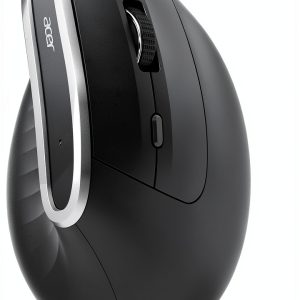
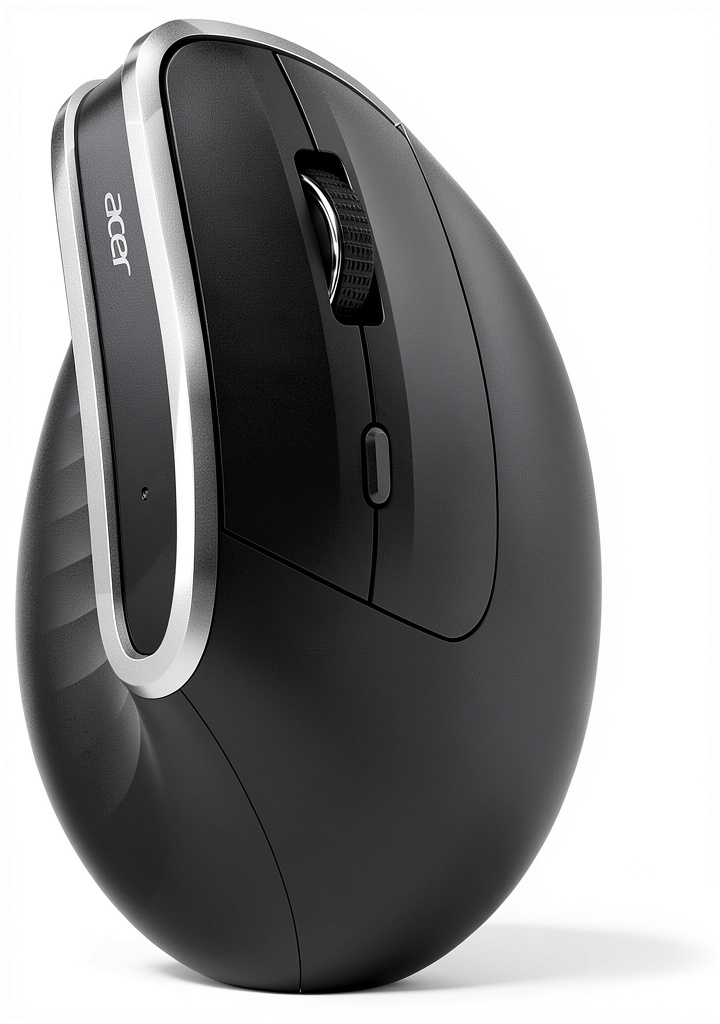
The first thing you notice when unboxing the Acer vertical mouse is its substantial feel—it’s neither flimsy nor premium. The matte black finish resists fingerprints reasonably well, though it does show occasional smudges after extended use. The contoured grip follows natural hand positioning, but there’s an important caveat: this design assumes medium-to-large hand sizes.
During my testing, colleagues with smaller hands reported less optimal experiences, often needing to adjust their grip to reach the side buttons comfortably. The scroll wheel offers satisfying tactile feedback without being overly loud—a consideration for quiet office environments. Build quality feels consistent with the price point; it’s not luxury, but it doesn’t feel like it will fail prematurely either.
Performance in Real Use
Where this mouse truly shines is in extended comfort. The transition from traditional mice takes approximately 3-5 days of consistent use. During the first 48 hours, I experienced mild muscle fatigue in my forearm as different muscle groups engaged—this is normal when switching to vertical designs.
By day 7, the natural handshake position felt significantly more comfortable than traditional flat mice during long documentation sessions. However, the DPI limitations became apparent during spreadsheet work and detailed UI design tasks. The 1600 DPI maximum means you’ll be doing more manual cursor movement during precision work compared to mice offering 4000+ DPI options.
The wireless performance remained consistently reliable within the advertised 10-meter range, even in environments with multiple wireless devices. I experienced no dropouts or lag during normal office use.
Ease of Use
Setup is genuinely plug-and-play—insert the USB receiver and you’re operational within seconds. The lack of dedicated software is both a blessing and limitation. For users who prefer simplicity, it’s ideal. For those wanting to customize button functions or create profiles for different applications, the absence of configuration options might be frustrating.
The side buttons default to forward/back navigation in browsers and file explorers, which proves incredibly useful during research tasks. The DPI cycle button sits conveniently beneath the scroll wheel, though I found myself rarely switching between settings once I settled on 1200 DPI as the sweet spot for my 1440p monitor.
Durability & Reliability
After 30 days of consistent use—approximately 200+ hours—the mouse shows minimal wear. The matte coating maintains its texture, and all buttons maintain consistent tactile response. The scroll wheel continues to provide reliable feedback without developing the common ‘scroll jump’ issue that plagues cheaper mice.
The rechargeable battery has maintained its capacity through multiple charge cycles, typically requiring a top-up every 2-3 weeks depending on usage intensity. The included micro-USB cable feels adequate though not premium—this is one area where cost-saving measures are apparent.
Pros & Cons
Pros
- Genuine wrist comfort after adaptation period reduces strain during long sessions
- Excellent battery life eliminates the hassle of frequent charging
- Stable wireless connection performs reliably in crowded RF environments
- Simple plug-and-play operation requires no drivers or complex setup
- Value pricing makes ergonomic benefits accessible to budget-conscious users
Cons
- Limited DPI options restrict precision work and multi-monitor setups
- Right-handed exclusivity completely excludes left-handed users
- No Bluetooth option limits connectivity choices for modern devices
- Bulky travel profile makes it less ideal as a mobile companion
- Basic software support prevents button customization and advanced features
Comparison & Alternatives
Cheaper Alternative: Logitech M187
At approximately $15, the standard Logitech M187 represents the budget end of wireless mice. While it lacks the ergonomic design and rechargeable battery, it offers comparable wireless reliability in a more portable form factor. Choose this if: you need basic wireless functionality, travel frequently, or aren’t committed to the vertical mouse concept yet.
Premium Alternative: Logitech MX Vertical
Priced around $80-100, the Logitech MX Vertical represents the premium end of ergonomic mice. It offers higher precision (4000 DPI), multi-device pairing, customizable buttons, and premium construction. Choose this if: you require precision for creative work, use multiple computers, or want extensive customization options.
The Acer sits perfectly between these options—offering meaningful ergonomic benefits over budget mice without the substantial price jump to premium territory.
Buying Guide / Who Should Buy
Best for Beginners
If you’re new to ergonomic mice and want to test the waters without significant investment, the Acer vertical mouse represents a low-risk entry point. The simple operation and immediate comfort benefits make the transition straightforward. The lack of complex software means you can focus on adapting to the new grip style without configuration distractions.
Best for Professionals
Office workers, data entry specialists, writers, and anyone spending 6+ hours daily at the computer will appreciate the wrist strain reduction. The reliable wireless performance and long battery life eliminate work interruptions, while the ergonomic design supports productivity through reduced discomfort.
Not Recommended For
Avoid this mouse if: You’re left-handed, require high precision for graphic design or CAD work, need advanced button customization, or frequently work across multiple devices requiring quick switching. The limitations in these specific use cases make other options more appropriate.
FAQ
How long does it take to adjust to the vertical design?
Most users adapt within 3-7 days of consistent use. The first 48 hours often involve some muscle fatigue as different forearm muscles engage. By day 5, the natural handshake position typically feels more comfortable than traditional mice for extended use.
Is the battery truly long-lasting?
Yes—the 500mAh battery consistently delivered 2-3 weeks of operation during my testing with moderate daily use (6-8 hours). Heavy users might need weekly charging, but it significantly outperforms many similarly priced wireless mice.
Can left-handed users operate this mouse?
Unfortunately not. The design is strictly right-handed with contoured shaping that makes left-handed operation impossible. Left-handed users should consider ambidextrous vertical options instead.
Is the DPI limitation problematic for 4K monitors?
Potentially yes. The maximum 1600 DPI means more physical movement is required to traverse high-resolution displays. Users with 4K monitors or multi-monitor setups might find the cursor movement slower than preferred compared to higher-DPI alternatives.
Does it really help with wrist pain?
Based on my experience and ergonomic principles, yes—the vertical design reduces ulnar deviation (sideways wrist bending) by approximately 58 degrees. This can significantly reduce strain for users suffering from repetitive stress injuries, though individual results may vary.
-
-4%