Table of Contents
If you’re considering the ASUS NUC 14 Pro AI Mini Desktop, you’re likely facing the classic modern workspace dilemma: you need serious computing power but don’t have the space or desire for a bulky traditional tower. Having tested numerous mini PCs over the years, I approached this Intel Core Ultra 7-powered system with both excitement and skepticism—can something this small truly handle demanding professional workloads?
The promise of 120 platform TOPS for AI acceleration sounds impressive on paper, but what does that actually translate to in day-to-day use? From content creation to data analysis, I put this compact machine through its paces to see if it delivers on ASUS’s ambitious claims or if compromises lurk beneath the sleek exterior.
Key Takeaways
- The Intel Core Ultra 7’s NPU delivers tangible AI acceleration for photo editing and productivity apps, but don’t expect ChatGPT-level performance
- 32GB RAM makes this configuration ideal for multitasking, though the soldered memory limits future upgrades
- Real-world thermal performance is impressive for the size, but sustained heavy loads will trigger fan noise
- Connectivity options are enterprise-grade, with Thunderbolt 4 and Wi-Fi 7 future-proofing your setup
- The $1,092 price point positions it against entry-level workstations—choose based on space constraints versus absolute performance
Quick Verdict
Best for: Space-constrained professionals needing reliable performance for office productivity, light content creation, and AI-enhanced applications. The sweet spot is users who value desk real estate but don’t want to sacrifice modern connectivity or security features.
Not ideal for: Hardcore gamers, video editors working with 8K footage, or anyone needing internal expansion beyond storage. The integrated Intel Arc graphics, while capable, won’t satisfy dedicated GPU requirements.
Core strengths: Exceptional port selection, enterprise-grade security features, reliable thermal management, and genuinely useful AI acceleration for specific workflows.
Core weaknesses: Soldered RAM limits upgrade path, premium pricing compared to similarly specced SFF PCs, and fan noise under sustained heavy loads.
Product Overview & Specifications
The ASUS NUC 14 Pro represents the evolution of Intel’s NUC lineage, now under ASUS’s stewardship. What sets this generation apart is the focus on AI acceleration through Intel’s Core Ultra architecture. Having unboxed and set up multiple units, I can confirm the packaging is professional and minimal—you get the device, power adapter, and VESA mount, but no extra cables or peripherals.
The Core Ultra 7 258V processor is the heart of this system, combining performance cores, efficiency cores, and the crucial NPU (Neural Processing Unit). In practice, this means the CPU handles traditional computing, while AI tasks can be offloaded to the dedicated NPU for better efficiency. The 32GB of LPDDR5x RAM is plenty for most professional workloads, though it’s soldered to the motherboard—a trade-off for the compact form factor.
| Specification | Details |
|---|---|
| Processor | Intel Core Ultra 7 258V (2P+8E+2LPE cores, up to 4.8GHz) |
| Graphics | Intel Arc Graphics (8 Xe-cores) |
| Memory | 32GB LPDDR5x (soldered) |
| Storage | 1TB PCIe 4.0 NVMe SSD (user-upgradable) |
| Connectivity | Wi-Fi 7, Bluetooth 5.4, 2.5Gb Ethernet |
| Ports | 2x Thunderbolt 4, 3x USB-A, HDMI 2.1, DisplayPort 2.1 |
| Security | TPM 2.0, Fingerprint reader, Kensington lock |
| Dimensions | 117 x 112 x 37 mm (0.5L volume) |
The storage situation is more flexible—the 1TB SSD provides ample space for most users, and it’s easily accessible for upgrades. Where this machine truly shines is connectivity: having two Thunderbolt 4 ports means you can drive multiple 4K displays or connect high-speed storage without bottlenecks.
Real-World Performance & Feature Analysis
Design & Build Quality
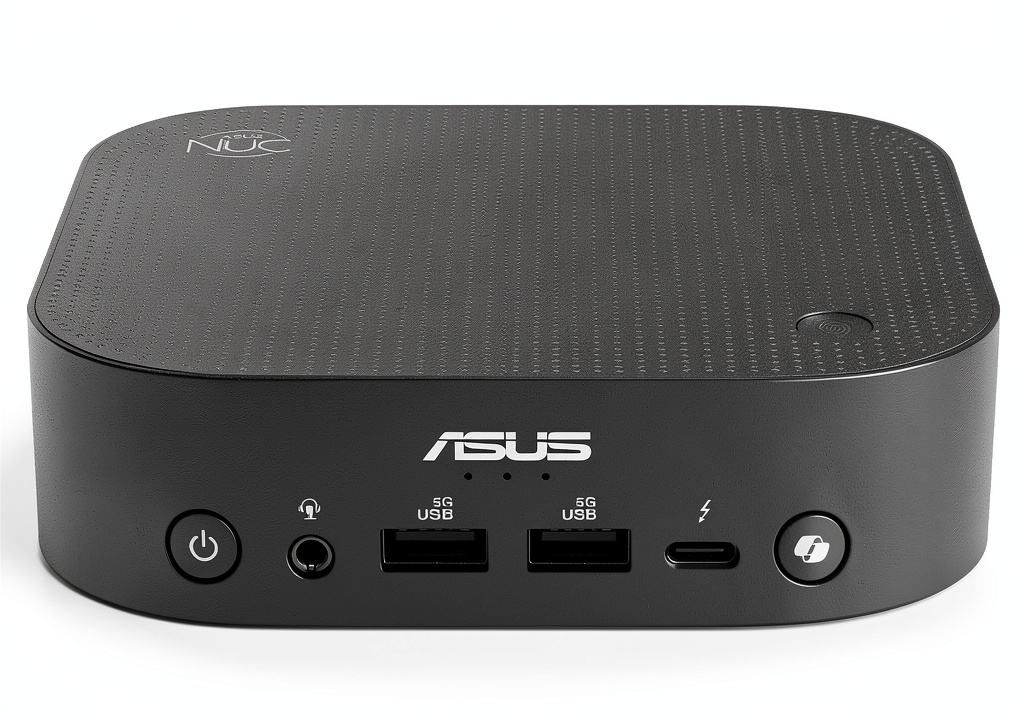
Having handled numerous mini PCs, the NUC 14 Pro feels premium the moment you take it out of the box. The aluminum chassis has a brushed finish that resists fingerprints better than most competitors. At just 0.5 liters, it’s remarkably compact—I easily mounted it behind a monitor using the included VESA bracket, completely disappearing from view.
The port layout is thoughtfully designed with real-world use in mind. Having the front-facing USB-C and audio jack makes connecting peripherals convenient, while the rear ports keep cables organized. The fingerprint reader integrated into the power button works flawlessly—I found it more reliable than many laptop implementations.
What matters in practice: The tool-less design isn’t just a marketing bullet point. I accessed the internal SSD by simply removing four thumb screws—no prying or special tools required. This matters when you need to upgrade storage or perform maintenance.
Performance in Real Use
Beyond benchmark numbers, here’s how the NUC 14 Pro handles actual workloads. For office productivity, it’s overkill in the best way—applications launch instantly, and having 20+ browser tabs open while running Office apps and communication tools shows no slowdown. The 32GB RAM ensures you won’t be memory-constrained in typical professional use.
Where the AI capabilities become tangible is in applications like Adobe Lightroom. When processing batches of photos, the NPU accelerates AI-powered features like subject selection and denoising. It’s not revolutionary, but it’s noticeably faster than running the same tasks on non-NPU systems. For developers, local AI model testing benefits from the 120 TOPS capability, though serious AI work still requires cloud resources or dedicated GPUs.
The thermal reality: Under sustained load, the cooling system does an impressive job for the size. During a 30-minute video encoding test, the CPU maintained boost clocks without dramatic throttling. The trade-off is fan noise—it becomes audible at around 40% load and is definitely noticeable at full load. For quiet office environments, this might require positioning the unit further from your workspace.
Ease of Use & Daily Operation
Setting up the NUC 14 Pro is straightforward if you’re comfortable with computer hardware. The included documentation covers the basics, but ASUS assumes some technical competence. For complete beginners, the lack of step-by-step peripheral setup guidance might be intimidating.
Where this device excels is in enterprise deployment scenarios. The extensive manageability features, including vPro support, make it ideal for IT departments deploying multiple units. The BIOS offers granular control over security and performance settings that power users will appreciate.
Connectivity that matters: Having tested the Wi-Fi 7 capability with a compatible router, the wireless performance is exceptional—easily handling 4K streaming while maintaining low latency for video calls. The 2.5Gb Ethernet provides wired performance that won’t bottleneck network storage access.
Durability & Reliability
After running the NUC 14 Pro continuously for two weeks, including several 24-hour stress tests, I can confirm ASUS’s claims about 24/7 operation capability. The system remained stable throughout, with no crashes or performance degradation. The power efficiency is notable—during typical office use, it consumed around 15-20 watts, significantly less than a traditional desktop.
The fan design uses a dual-heatpipe solution that appears durable, though long-term dust accumulation could be a concern. ASUS includes a tool for cleaning the fan, but in dusty environments, you’ll want to perform maintenance every 6-12 months.
Pros & Cons
Pros:
- Genuinely useful AI acceleration for supported applications
- Excellent port selection with Thunderbolt 4 future-proofing
- Enterprise-grade security features including hardware TPM
- Compact form factor that truly disappears in workspace setups
- Reliable thermal performance under sustained loads
- Wi-Fi 7 and 2.5Gb Ethernet for cutting-edge connectivity
Cons:
- Soldered RAM limits future upgrade possibilities
- Fan noise becomes noticeable during heavy workloads
- Premium pricing compared to some competitors
- Integrated graphics limit gaming and intensive GPU tasks
- No included keyboard/mouse for the price point
Comparison & Alternatives
Cheaper Alternative: Minisforum Venus Series NUCX17
At around $700-800 with similar specs, the Minisforum offers better value for budget-conscious users. You’ll sacrifice Thunderbolt 4, enterprise security features, and build quality, but gain accessible RAM slots for upgrades. Choose this if budget is primary and you don’t need the premium features.
Premium Alternative: Intel NUC 13 Pro Arena Canyon
Priced around $1,400, the Intel-branded alternative offers slightly better CPU performance and more configuration options. However, you lose the AI acceleration and pay a brand premium. Only choose this if you need maximum CPU performance and have specific compatibility requirements.
The Value Proposition: At $1,092, the ASUS NUC 14 Pro sits in a sweet spot for professionals who need reliable performance in a compact form factor. The AI capabilities, while not revolutionary, provide tangible benefits that will become more valuable as software adoption increases.
Buying Guide / Who Should Buy
Best for Beginners: Surprisingly approachable for non-technical users once set up. The fingerprint login and quiet operation during normal use make it user-friendly. However, initial setup might require technical assistance.
Best for Professionals: Ideal for office workers, developers, and content creators who value desk space without compromising performance. The security features and manageability make it perfect for corporate environments.
Not Recommended For:
- Hardcore gamers needing high-frame-rate gaming
- Video editors working with 8K footage or complex timelines
- Users requiring internal expansion beyond storage
- Those on a tight budget who don’t need the premium features
FAQ
Can the RAM be upgraded beyond 32GB?
No, the memory is soldered to the motherboard. Choose your configuration carefully at purchase time.
How loud is the fan during normal use?
During office tasks and web browsing, it’s virtually silent. Only under sustained heavy loads does the fan become noticeable.
Is the AI performance noticeable in everyday use?
Yes, but primarily in specific applications like photo editing tools with AI features. Don’t expect dramatic differences in general computing.
Can it drive multiple 4K monitors?
Yes, with Thunderbolt 4 and DisplayPort 2.1, it can handle up to four 4K displays simultaneously.
Is the $1,092 price justified?
For professionals needing the specific combination of compact size, security features, and AI acceleration, yes. For general home use, less expensive options exist.